MDM Solution for Education

Simplify learning with mobile device management (MDM) for schools

Take total control of your digital classroom with the best mobile device management for schools. Scalefusion allows you to monitor your entire fleet through a single dashboard. We provide robust device management for schools to push school-friendly policies, automate updates, and ensure seamless device management.

Trusted by 12000+ businesses globally.

G2 Crowd 2026
G2 Crowd 2026
G2 Crowd 2026
Scalefusion for Education
Multi-OS management

MDM for Schools That Works Across All Platforms.

Education is no longer confined to traditional classrooms. Whether it’s a tablet for students, a shared device in a lab, or faculty laptops, manage all devices seamlessly with MDM software for schools.

Windows Management

Power your e-learning with the devices students are most familiar with. Unleash the power of Windows laptops, desktops and Surface devices for education.

  • Streamline bulk device provisioning with Windows Autopilot

  • Enforce BitLocker encryption to safeguard for student records and sensitive data

  • Convert lab PCs into single or multi-app kiosks to create secure exam environments.

  • Deploy PowerShell Scripts to configure classroom PC settings and automated resets

Learn more
Windows
macOS Management

Turn your institutions into tech-forward workplaces by equipping your employees with Macbooks and iMacs. Reinvent learning with Macs for classrooms and education.

  • Streamline zero-touch provisioning with Apple Device Enrollment via Apple Business

  • Provision educational apps silently via the macOS app catalog to eliminate manual software setup

  • Apply web content filtering and parental controls to enforce safe browsing policies

  • Deliver custom payloads to automate classroom Wi-Fi configurations and security baselines

Learn more
macOS
ChromeOS Management

Transform your ChromeOS devices into powerful learning tools. Centrally manage student devices and apps while ensuring a safe digital environment with content filtering and parental controls.

  • Deploy lightweight cloud terminals with seamless zero-touch enrollment

  • Use allowlist and blocklist to enforce safe browsing, domain blocks, and parental controls

  • Push educational portals, web apps, and browser shortcuts remotely to streamline digital classrooms

  • Enable background updates to keep student Chromebooks patched automatically

Learn more
ChromeOS
iOS Management

Offer your students the best-in-market devices, leverage the power of iPhones and iPads for schools.

  • Streamline zero-touch provisioning with Apple Device Enrollment via Apple Business

  • Lock iPads into single or multi-app kiosk modes to enforce secure test browsers and approved study tools

  • Whitelist and push approved educational applications silently without student intervention

  • Wipe or lock misplaced tablets remotely to protect sensitive student records

Learn more
iOS
Android Device Management

Manage all your diverse Android endpoints in an education environment including smartphones and tablets to enhance learning.

  • Seamless out-of-the-box enrollment with Android Enterprise support

  • Lock down devices into single or multi-app kiosk modes to restrict student access strictly to learning apps.

  • Restrict peripherals in classrooms to eliminate distractions during exam sessions

  • Troubleshoot student devices live during digital lessons using remote cast & control with VoIP support

Learn more
Android
Linux Management

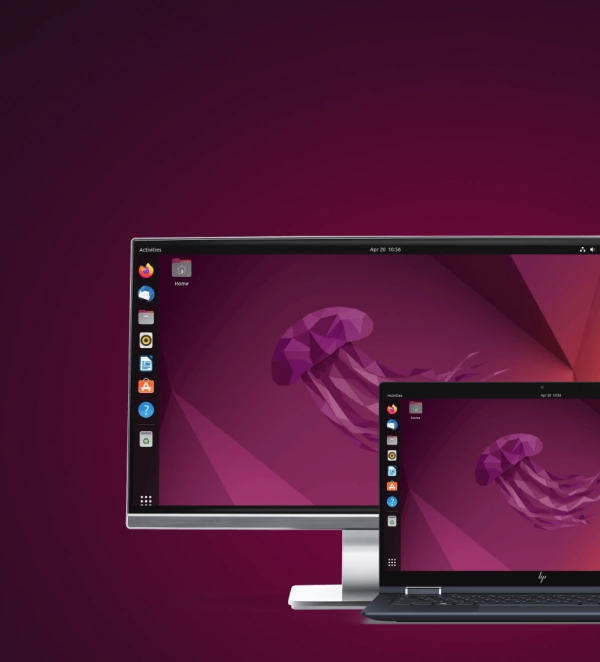
Secure and manage all your student desktops, developer workstations, and computer lab devices running a wide range of Linux distributions, including Ubuntu, Debian, Mint, and more.

  • Support for Multiple Linux Distributions (Ubuntu, Debian, Mint, etc)

  • Deploy custom Bash scripts to automate computer lab setups and routine maintenance resets.

  • Enforce strict passcode policies to maintain credential standards across student Linux desktops.

  • Track device health and troubleshoot devices in real time using a remote live terminal

Learn more
Linux
tvOS Management

Enable your shared classroom displays, library monitors, and digital signage by centrally managing Apple TV devices to deliver media and alerts.

  • Seamless onboarding and digital signage setup via Apple Business

  • Lock Apple TVs into single-app kiosk mode to display continuous lesson materials or notice boards

  • Push classroom display apps remotely via VPP to update shared monitor remotely

  • Restrict AirPlay and screen-sharing privileges strictly to authorized teachers and staff.

Learn more
tvOS

Special pricing plans for educational institutions.

Local language support

Quick deployment

Onsite support

Personalized training

Benefits

Why choose Scalefusion MDM for education?

Managing devices in your institutions should be seamless. Scalefusion MDM solution for education streamlines device management, fortifies digital learning environments, and ensures secure online learning—so your students and faculty can focus on learning.

Effortless device management

Deploy, configure, and secure student and faculty devices without breaking a sweat. One platform, total control.

Sharp-focused learning

Cut the clutter. Lock devices into a distraction-free environment where only education takes center stage.

Seamless content flow

Assignments, study materials, and school updates—delivered instantly, ensuring every student stays in sync.

Security, without compromise

From safe browsing to app restrictions, ensure digital safety and compliance without second-guessing.

Uninterrupted learning, anywhere

Technical hiccups? Resolve issues remotely in real-time so learning never hits pause.

Smarter insights, stronger decisions

Track screen time, and app usage with automated reports that power better learning outcomes.

Shared iPads Illustration
Shared iPads

One iPad, multiple users.

Allow multiple users to access a single device. Enable the profile switch with every student login, ensuring a personalized experience while keeping data secure. Reduce device costs, simplify classroom device management, and create a seamless learning environment for every student with Scalefusion MDM.

IFPD

IFPD management software for interactive learning.

Manage and secure all your IFPDs (Interactive Flat Panel Displays) from anywhere in the world, running on any operating system. Remotely control your screens and perform multiple actions, including troubleshooting, content pushing, application management, access limitation, school branding, and more. Keep your devices and your institute’s productivity running at its peak.

Scalefusion for Education
All Products

Future-ready education with Scalefusion’s multi-product suite.

Scalefusion UEM + OneIdP

Secure, streamlined,
shared learning.

Enable seamless and secure shared device usage in classrooms and labs. Ensure every session starts fresh—personalized profiles, restricted access to non-educational content, and automatic session resets for a clutter-free learning environment.

sf_uem_and_oneidp
Scalefusion UEM + Veltar

Integrated endpoint management with security.

Enhance security with web content filtering and secure browsing. Protect student data, block malicious sites, and create a safe online learning environment while ensuring compliance with educational IT policies.

custom_url_filtering

Explore the most reliable MDM solutions for schools.

Scalefusion for Education

Seamless device management for a digital-first campus.

Deploy, configure, and manage student and faculty devices at scale without IT bottlenecks. Enable zero touch enrollment without the need of any end user intervention.

Features

Bulk Device Provisioning

Focused learning, at all times.

Keep students on track with restricted access to non-educational content using Scalefusion MDM for schools. Enable kiosk mode to lock devices into learning apps, assessments, or specific coursework—ensuring undivided attention in classrooms and remote settings.

Scalefusion for Education

Deliver educational content, in an instant.

Streamline content sharing across devices with instant distribution of assignments, study materials, and notifications. Ensure students and faculty receive critical updates without delays.

Features

Secure File Sharing

BYOD without compromise.

Enable students and faculty to use personal devices while keeping academic and personal data separate. Restrict unauthorized apps, enforce browsing policies, and maintain security without interfering with privacy.

BYOD Illustration
Scalefusion for Education

Safeguard student data & ensure compliance.

Enforce strict security measures to protect student identities and institutional data. Implement browsing restrictions, block unauthorized apps, and maintain compliance with data privacy regulations.

Features

Secure Browsing

Scalefusion for Education

Remote learning, with uninterrupted support.

Ensure seamless digital learning experiences with real-time remote support. Troubleshoot device issues, push updates, and assist students or faculty—no matter where they are.

Features

Remote Troubleshooting

Scalefusion for Education

Optimize learning with smart insights.

Track student screen time, and app usage to refine digital learning strategies. Automate reports for real-time insights, ensuring devices are optimized for education.

Scalefusion for Education

Enable device sharing for multiple users.

Facilitate device sharing among students in different time slots or grade levels. Configure personalized profiles for K-12, higher education, or special learning programs.

Features

Multi-User Profiles

Scalefusion for Education

Keep campus devices on track with location tracking.

Monitor and track student and faculty devices in real-time. Set up geofencing to enhance safety and receive alerts on unauthorized movements.

Features

Geofence Alerts

More features to strengthen your educational device management.

ic_time_based_policies

Time-Based Policies

Automate policy enforcement based on school hours. Restrict app and internet access during class time while enabling flexibility after school.

ic_workflows

Workflows

Reduce IT workload by automating routine device management tasks related to your recurrent operations.

ic_groups

Groups and Subgroups

Organize student and faculty devices for streamlined policy application and simplified management.

ic_custom_branding

Custom Branding

Personalize devices with institutional logos and themes to maintain a consistent brand identity.

ic_screen_broadcasting

Digital Signage

Share school updates, and announcements via digital signage for enhanced communication.

ic_peripheral_management

Peripheral Management

Control and restrict the use of device peripherals such as cameras, Bluetooth, USB ports, and external storage to enhance security.

ic_application_usage

Application Usage Insights

Monitor which educational apps have more screen time and are being used the most.

ic_patch_management

Configure Patch Management

Ensure student and faculty devices are always up to date with the latest security patches and software updates.

ic_remote_lock

Lost Mode & Remote Lock

Secure lost or misplaced devices by remotely locking them or displaying a custom message with contact details for retrieval.

ic_battery

Battery & Storage Monitoring

Get real-time alerts on device battery health and storage status to ensure uninterrupted student learning.

ic_emergency_alerts

Emergency Alerts & Broadcasts

Instantly send critical messages to all devices in case of emergencies.

Frequently asked questions

Mobile Device Management (MDM) for schools is used to remotely manage and monitor mobile devices such as smartphones, tablets, and laptops that are utilized by students and staff within an educational institution. It allows administrators to enforce security policies, deploy applications, and control access to educational resources, ensuring efficient device usage, safeguarding sensitive data, and promoting a conducive learning environment. MDM software also facilitates device inventory management and troubleshooting, streamlining IT operations in the school setting.

Get a Demo