Kiosk Software
Lockdown devices in Kiosk Mode with Scalefusion kiosk software.
Scalefusion kiosk software allows IT admins to lock any device in single or multi-app kiosk mode. Prevent unauthorized access and limit excess data costs.

Scalefusion kiosk software allows IT admins to lock any device in single or multi-app kiosk mode. Prevent unauthorized access and limit excess data costs.
Positioned in the Midmarket Context: Magic Quadrant for UEM by Gartner

Configure corporate-owned devices for business by locking them in single or multi-app kiosk mode. Disable non-business apps and websites to prevent employee distractions and device misuse.
Kiosk software for Android
Lockdown any Android device restricting the user to a specific app(s) or website(s). Prevent users from closing or switching between apps.
Know moreKiosk software for iOS
Showcase your product on your interactive iPads and iPhones by transforming them into interactive kiosks with Scalefusion iOS kiosk solution.
Know moreKiosk software for Windows
Set your Windows desktops, laptops, and POS systems in Kiosk Mode. Limit user activities to a single business app and enhance user experience.
Know more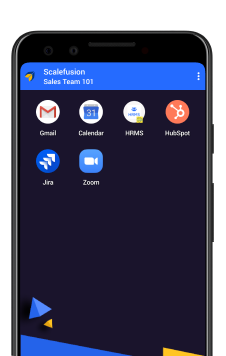
Multi-App Kiosk Mode
Allow two or more apps on Android devices with Multi App Mode, blocking the rest.
Custom Branding
Factory Reset Protection
Hide the bottom navigation bar from the screen
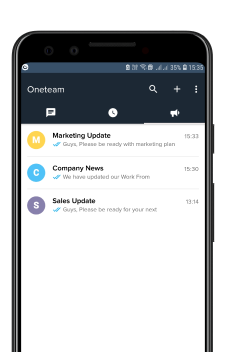
Single-App Kiosk Mode
Run any application/website in Single App Mode even when the device reboots. Ensure the select app runs at all times.
Block hardware keys
Set delay to launch the app
Set device screens in Full Screen mode
Enhance your device management experience with Scalefusion’s powerful and intuitive features.
GPS-based Location Tracking
Track Android, Windows, and iOS device locations in real-time. Use Open Maps or integrate Google Maps with Scalefusion dashboard.
Geofencing
Create and apply virtual boundaries to actual physical locations. Receive alerts when a device enters or exits a geofence.
Advanced settings
Get the entire route history, pitstops, and lock apps based on speed limits. Choose the frequency of collecting location details.
IP-based Location Tracking
For macOS devices, track device location using IP address.
Push content files
Push up-to-date business resources in diverse file formats. Publish content files on multiple devices at once.
Create folders and subfolders
Publish content in contextual folders and subfolders for easy access.
Upload via External Drive
Save content management space by uploading file links on the Scalefusion dashboard.
Create presentations
Create interactive presentations with video, audio, and image files. Play presentations on a loop or set as screensavers.
Certificate Management
Push digital certificates for authenticating connections to enterprise Wi-Fi.
Enforce passwords
Create robust password policies. Enforce password complexity and set password expiry schedule.
SafetyNet Attestation
Perform Android device integrity, security, and compatibility checks and assign appropriate policies.
Control Screen Capture
Restrict your employees from taking screenshots of work apps on their personal devices.
Route traffic via VPN
Route traffic for your on-prem assets. Ensure encrypted, anonymous data transmission over public networks.
Data Sharing Restrictions
On BYO devices, restrict users from copying/sharing data or documents from work apps to personal apps.
Automate recurring IT tasks
Save IT cognitive load by automating recurring IT tasks. Schedule tasks and receive real-time reports on task completion.
Detect compliance violations
Detect any compliance violations via automated, scheduled checks and alerts and take appropriate actions accordingly.
Administrator activity logs
Get insights into the activities performed by administrators on the Scalefusion dashboard. Reduce human errors with Maker-Checker.
Obtain device health reports
Select device parameters that you want to keep track of. Receive comprehensive reports for each.
Out-of-the-box Enrollment
Drive OOB enrollment with Android Zero-touch, Apple DEP, and Windows Autopilot Program for Android, Apple, and Windows devices respectively.
Bulk Enrollment
Enable bulk enrollment by uploading a CSV of IMEI numbers and Serial numbers on the Scalefusion dashboard.
QR code-based Enrollment
Streamline device setup in a few simple steps. Enable enrollment by simply scanning a QR received over email.
AD-based Enrollment
Integrate Office 365, Azure, or G Suite Active Directory to the Scalefusion dashboard. Import or invite users to device management.
EMM Token Enrollment (AFW#)
Enroll company-owned Android devices when they are unboxed or after a factory reset. Perform six taps on the device screen and scan a QR Code.
Samsung KME-based Enrollment
Streamline enrollment of Samsung devices with KME-based enrollment. Easily roll out policy configurations and automatically enroll devices in bulk.
Leverage deep Zebra-specific kiosk capabilities so enterprises can run purpose-built operations without distraction or misuse.
Know moreManage your indoor and outdoor digital signage kiosks with Scalefusion MDM. Lock devices to a single browser tab, application, or presentation loop. Make and push content presentations directly from the Scalefusion dashboard.
Run presentations using Scalefusion Presentation Mode.
Ensure always-on display and uninterrupted operations with remote troubleshooting.
Push business apps with ease. Install applications from the App Store, Google Play Store, and Windows Business Store via the Scalefusion dashboard.
Know moreRemote Cast & Control lets IT teams manage and troubleshoot kiosks instantly, ensuring devices stay productive and issues are resolved without delays.
On Android and Windows devices, instantly mirror screens, take charge, and resolve issues without delays.
On iOS and macOS devices, remotely view and interact with screens to troubleshoot efficiently.
Capture screenshots, record sessions, and generate context-aware support tickets directly on ITSM platforms.
Scalefusion kiosk software is user-centric, crusading to help businesses generate measurable growth, improved efficiency & reduced costs with mobility.
Know moreSave cost, increase productivity
Upkeep device performance to improve productivity by troubleshooting device issues remotely.
Reduced manual IT work
Provision devices in bulk, and improve IT productivity by automating data-driven compliance checks & security alerts.
Start managing devices in 20 minutes
Easy-to-use solution with a short learning curve, facilitated with industry-leading support to ensure faster time-to-market.
Know how Scalefusion’s Android management helped Stanley Hotel and Suites secure their devices from theft
Know moreScalefusion Kiosk Software helps organizations across industries to stay ahead of the curve by enhancing their productivity & performance with the use of digital devices.
Education
Prevent students from playing games or watching videos on school-owned devices in the classroom to make the learning experience more exciting & engaging.
Know moreRetail
Manage your tablets, smartphones & point of sales (POS) devices with Scalefusion by giving control to the admin to remotely enable/disable the app on the device.
Know moreLogistics
Restrict access to unwanted apps, gaming, and video apps streaming on company-owned devices using Kiosk Lockdown App. Track the device location in real-time.
Know moreScalefusion Kiosk Software helps organizations across industries to stay ahead of the curve by enhancing their productivity & performance with the use of digital devices.
A kiosk mode is a function in which any device is restricted to running either single or multiple apps. There is browser kiosk mode where any browser is locked to run one or certain specific websites only. Kiosks can be dedicated devices, self-service devices, or unattended devices.
Kiosk software is UI software designed for controlled interactive sessions between a kiosk-mode device and end users. The kiosk software is responsible for controlling the user interface and managing the kiosk's functions and capabilities. Any interactions outside the preset configurations cannot be executed when devices run in kiosk mode. Kiosk software provides an efficient and cost-effective way for businesses to offer customers self-service options while improving the overall customer experience.
A kiosk management software is a tool that lets IT admins manage kiosks remotely. Kiosk management software gives IT admins complete control over the configuration, content and branding elements of kiosk-mode devices. Kiosk management software also allows IT teams to troubleshoot kiosks without any manual intervention.
Kiosk mode is a great way for businesses of all sizes to ensure certain devices serve only the intended purposes as per business requirements. Kiosk mode ensures high employee productivity, better customer experience, and longer device lifecycle.
Kiosks are important touchpoints for businesses in terms of the data they collect and the apps they run. There are plenty of use cases in which kiosks help streamline both device management and security. Examples include digital signage, POS systems, check-in & check-out points, etc.
To set up kiosk mode on any device, it has to be enrolled into mobile device management software. Once enrolled, IT admins can create a device profile and add the kiosk device to the profile. Thereafter, all the configurations and content can be applied for the device to run in kiosk mode.
Managing and monitoring kiosks remotely is easy and seamless through a mobile device management dashboard. IT admins can set the kiosk as a single or multi-app device from the dashboard. In case of issues or errors, IT admins can also troubleshoot kiosks remotely.


