Digital Signage Software for Android

Digital Signage Software for Android devices & TVs.

Transform Android tablets, phones, and smart TVs into attractive digital displays. Schedule your media in advance, push real-time updates remotely, and block unauthorized changes so your screens always show exactly what you want.


G2 Crowd 2026
G2 Crowd 2026
G2 Crowd 2026
digital signage hero image

12000+

Customers

120+

Countries

100+

In-house experts

Scalefusion is validated by top OEMs. 

Scalefusion supports and validates a wide range of enterprise devices across leading OEMs.

Digital Signage software
Devices

Turn any Android device into a dedicated digital display.

Windows Device Management

Phone & Tablet

Windows Device Management

Rugged Devices

Windows Device Management

Smart TV

Windows Device Management

Point of Sale

One-stop Android digital signage software. 

Create digital experiences that run as per your imagination. Set playback timing, automate presentations, choose screen orientation, always keep the displays active, and enable touch interaction all from a central dashboard to keep every display in sync.

Digital Signage software

Multi-format media playback

Upload and display images (PNG, JPG, GIF), videos (MP4) & combine them into presentations on your Android devices.

Continuous loop playback

Run promotional presentations on an automated loop without requiring any manual user interaction or on-site manual start.

Custom delay & interval timing

Fine-tune your presentation speed by setting custom time intervals between images and video transitions

Enforced screen orientation

Enhance the viewer’s experience by remotely forcing landscape or portrait orientation across Android phones, tablets, and smart TVs. 

Configure screensaver mode

Set custom screensavers during idle time or enable Always-on mode for uninterrupted 24/7 visual broadcasting.

Android digital signage software built for modern businesses.

Keep your displays updated with the latest content, showcase information, and create engaging experiences across every location. Manage, update, and monitor every screen remotely from a single console without setting foot near your digital displays.

content_management

Content Management

Upload, organize, and push images, videos, or presentations to targeted Android screens or device groups from a single dashboard. Update or remove content remotely to keep every screen fresh, relevant, and on-brand.

mode

Single & Multi-app Kiosk Mode

Lock your Android devices to a single app or a multi-app kiosk mode, restricting users from tampering with hardware keys and navigation, making it exclusively focused on business operations.

centralised_management

Centralised Management

Bring every Android display under one roof. Push updates, monitor devices, and troubleshoot issues across the entire fleet from a single dashboard.

location

Location & Geofencing

Set virtual perimeters for your Android displays around a particular region, track device movement, and trigger policies or workflows when devices enter or leave defined boundaries.

live_content

Live Content Streaming

Stream real-time video feeds and live event broadcasts straight to your Android displays via Android TV Boxes to keep your audience updated with live information.

custom_branding

Custom Branding

Make every display reflect your brand identity. Customize wallpapers, color schemes, and app icon layouts remotely to deliver a consistent experience across all screens.

Power every screen with Android-based digital signage software.

Features

Purpose-built Android digital signage software for dynamic media and dedicated displays.

Scale your display network with complete confidence. Manage screen health, deploy silent background updates, and enforce robust protection across every screen from a single dashboard, without interrupting the viewer experience.  

OS & App Update Management

Keep your displays up to date, running on the latest version always. Schedule OS patches and app updates silently in the background, without interrupting the audience experience.

Device Groups & Device Profiles

Organize Android displays by location, department, or purpose. Apply the right settings and push content to each group at once. Keep every screen aligned to its specific role without managing them individually.

DeepDive

Gain full visibility into display health and performance. Track screen uptime, network stability, hardware metrics, and data usage to resolve issues and prevent downtime.

Device Security & Restrictions

Protect your public displays from digital tampering with hardware restrictions, strict passcode policies, and Factory Reset Protection (FRP).

Remote Troubleshooting

Your Android digital signage, always within reach.

Monitor, cast, and troubleshoot your digital signage for Android devices from anywhere. View live screens, perform actions remotely, sync files, and resolve issues in minutes, without expensive site visits or facing operational downtime.

illus manage
remote_cast

Remote Cast

Mirror signage screens in real time and invite admins to troubleshoot issues together.

calling

VoIP Calling

Talk to on-site users directly from the dashboard and resolve device issues remotely.

recording

Session Recording

Capture every support session for compliance, training, and audit purposes.

remote_control

Remote Control

Interact with supported devices remotely to resolve issues faster.

file_sync

File Sync

Upload, download, or remove files without visiting the device.

device_actions

Device Actions

Reboot, refresh, lock, or unlock devices remotely from one dashboard.

Set up your Android digital signage player in three quick steps.

Get your digital signage for Android up and running in minutes. Three steps are all it takes to transform your normal Android device into a smart display at malls, stores, or lobbies.

Digital signage kiosk software: Presentation Mode

1

Upload the content

Add images and videos, or import supported content directly from your gallery onto the dashboard.

2

Streamline your media

Arrange your content, customize playback settings, and create engaging presentations in minutes.

3

Publish to your displays

Push your presentation or media to a single Android screen, a group of devices, or your entire fleet with one click.

Bring your idle screens to life with this Android digital signage player.

One Android digital signage software. Built for every industry.

Retail

Turn your Android tablets into interactive product catalogs or use Android TV screens for point-of-sale promotions with an Android digital signage player. Launch flash sales, festive campaigns & promotions from one console. Prevent distractions with Kiosk mode, lock devices strictly to your promotional loops, preventing customers from exiting the app.

illus_retail

Education

Manage your Android TVs across campus libraries and hallways. Schedule timetables, announcements, and events with the Android digital signage player from a centralized console. Deploy educational apps on students' Android tablets and lock them into a multi-app kiosk mode for a secure, distraction-free learning experience.

illus_education

Healthcare

Keep patients informed and operations moving with Android TVs for waiting-room displays and tablets for self-service check-ins through Android-based digital signage software. Lock devices to approved apps with Kiosk Mode and push health notices, staff schedules, and duty rosters across all hospital branches in a click. 

illus_healthcare

Hospitality

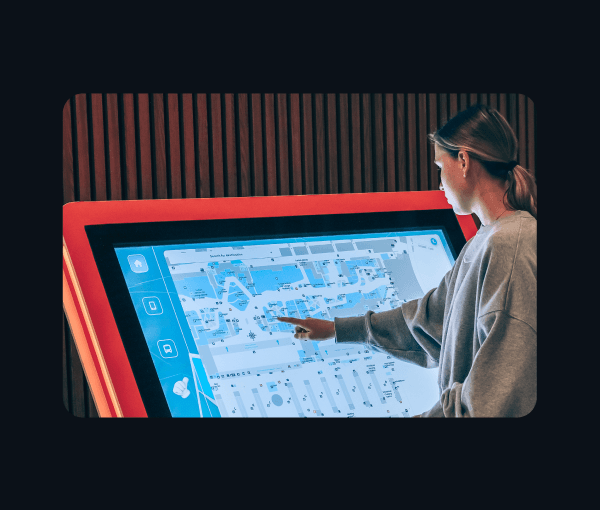
Elevate the guest experience by turning lobby screens into personalized welcome displays, wayfinding maps, and real-time event guides with our Android digital signage player. Through content management, only display hotel maps and promotional loops to keep your guests focused on your communications. 

illus_hospitality

Logistics

Streamline floor operations by displaying real-time shipment targets, dock alerts, and safety guidelines on rugged Android screens. Lock the displays strictly to operational apps with multi-app kiosk mode. Push live announcements and manage shift schedules across all your logistics hubs from one central dashboard with this Android digital signage software.

illus_logistics

Android is just the beginning. Power any OS from one dashboard. 

Start your display network with our Android digital signage player today, and effortlessly scale to Windows, Apple, or ChromeOS devices tomorrow.
No new software to learn. No separate dashboards. Just one unified platform for every screen.

Your search for Android-based digital signage software stops here.

Frequently asked questions

It is a centralized cloud-based solution that transforms standard Android devices such as smartphones, TVs, tablets, and rugged devices into secure, dynamic digital displays. It combines automated media playback with secure kiosk lockdown, ensuring your screens run continuously without any unauthorized tampering.

Get a Demo